
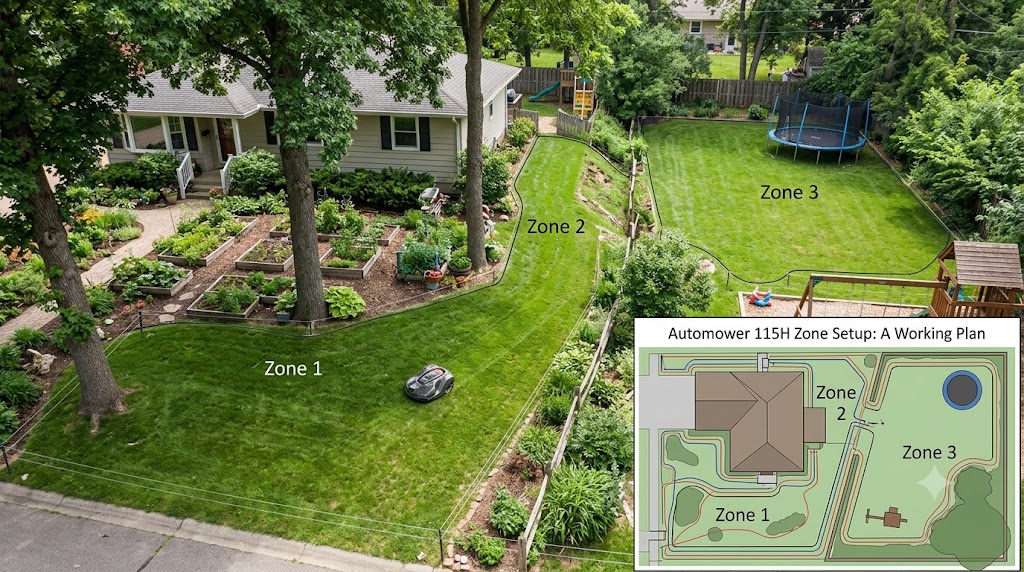
My neighbor’s Automower 115H used to get wedged behind the same propane tank cover every single week. Not because the mower was broken. Because the guide wire zone settings were never dialed in for his yard’s layout. Once he fixed the distances in the zone menu, the mower stopped needing weekly rescues. That one setting made a bigger difference than any accessory he’d bought.
Husqvarna automower zone setup on the 115H means telling the mower, in meters or feet along its single guide wire, where each section of a divided yard begins. The 115H does not have GPS-based zone mapping. It uses one physical guide wire and up to three distance-based zone markers to send the mower to different parts of a yard on a rotating basis. If your yard has narrow passages, detached sections, or oddly shaped corners, getting these distances right is what separates a mower that mows evenly from one that circles the same 10 square feet every day.
This guide walks through exactly how zone setup works on the 115H, where owners get it wrong, and what to check first if your mower keeps getting stuck.
What “Zone Setup” Means on the Automower 115H
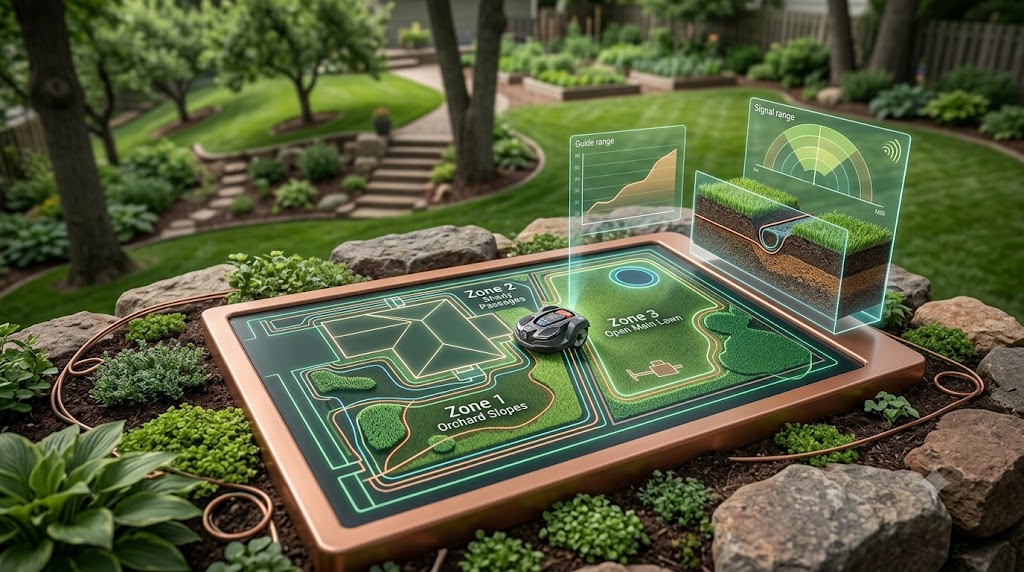
The 115H uses a single guide wire connected to the charging station. During setup, you measure distances along that wire and enter them into the mower’s keypad or the Automower Connect app as separate “zones,” each with its own percentage of mowing time. A common setup, based on real installer experience, looks like three markers at roughly 9, 30, and 55 meters from the dock, each sending the mower to a different section of the yard before it starts random-pattern mowing.
This is fundamentally different from the “Zone Control” feature found on Husqvarna’s newer X-Line and NERA models, which use GPS-assisted AIM Technology to let you draw work areas directly on a phone screen with no extra wire needed. The 115H predates that system. Reviewers and even some AI-generated troubleshooting threads online blend these two systems together, which is one of the most common sources of confusion for new 115H owners searching for setup help.
Why the 115H Only Uses One Guide Wire (and Why That Matters)
Husqvarna’s own installation guidance confirms the 115H requires a guide wire to find its way home, and the mower supports only one. Higher-tier models like the 430X, 450X, and NERA series accept two or three guide wires, which is what lets them route through multiple separate sections of a yard independently. With just one wire, every zone on a 115H has to branch off the same physical path, which limits how complex a layout you can realistically automate without upgrading.
If your lawn is a simple rectangle, one guide wire is plenty. If you have a side yard reached through a gate, a front lawn split by a driveway, and a back section behind a shed, you’re working with real constraints on a 115H, and understanding them before installation day saves a lot of frustration.
How to Set Up Mowing Zones, Step by Step
- Walk the yard first. Note every narrow gap, gate, and detached section before laying any wire. Fill in holes and clear sticks, since the mower’s sensors react to obstacles by changing direction abruptly.
- Lay the guide wire along the longest usable path, keeping at least 30 cm (12 in) of separation from the boundary wire the entire way, as specified in Husqvarna’s official installation documentation.
- Measure the distance from the charging station to the start of each section you want treated as a separate zone. This is the number you’ll enter into the keypad or app.
- Enter up to three zone distances in the installation menu (Settings > Installation > Guide 1 in most keypad menus, or the equivalent screen in the Connect app).
- Assign a mowing frequency percentage to each zone so the mower doesn’t overmow the easy, open sections while ignoring the smaller or harder to reach ones.
- Run a full charge cycle and watch the first two passes. If the mower stalls at a specific point every time, that’s your cue to adjust either the zone distance or the passage width, covered next.
Narrow Passage Widths: What the 115H Can Actually Handle
This is the part most yard layouts fail on. Husqvarna’s own support documentation lays out specific minimum widths depending on whether a guide wire runs through the passage.
| Passage type | Minimum width | Guide wire required? |
|---|---|---|
| Boundary wire only, no guide wire | 2 m / 6 ft 6 in | No, but strongly recommended below this width |
| Boundary wire with a guide wire through the passage | 60 cm / 24 in between the two boundary wires | Yes |
| Guide wire to boundary wire clearance | 30 cm / 12 in minimum on each side | Applies to all passages |
Without a guide wire, a passage narrower than about 2 meters is a gamble. The mower may make it through occasionally, which matches what one 115H owner described on a lawn care forum: a passage in the 49 to 68 inch range worked inconsistently without a wire, but became reliable once a guide wire was run through it. If your side yard or gate opening is anywhere near that range, install a guide wire through it. Don’t rely on the mower “usually” finding its way.
Fixing a Mower That Keeps Getting Stuck in a Passage
If the 115H is bumping, backing up, and re-bumping in the same spot, two settings fix most cases before you touch a wrench.
Adjust the corridor width. The corridor is the strip of grass on either side of the wire that the mower is allowed to wander into while following it. Husqvarna allows this to be set between 1 and 9 on supported models. A narrower corridor keeps the mower tighter to the wire through a tricky gap.
Turn on systematic passage mowing if your unit supports it. Instead of using its normal random pattern in a passage, the mower switches to a straight-line pass at a set frequency, which reduces the odds of it clipping an obstacle at an angle and getting hung up.
If neither setting resolves it, the passage itself may simply be too tight for the model. That’s a layout limitation, not a settings problem, and no amount of menu tweaking will fix it.
Handling a Detached Section of Lawn
Some yards have a small patch of grass that isn’t physically connected to the main lawn by any passage a mower could use, like a front strip separated from the backyard by a driveway. Husqvarna’s fix for this is a “secondary area,” which is still enclosed in the same boundary wire loop as the main yard, but the mower has to be manually carried there rather than driving over on its own. It will mow that section normally once placed there, it just won’t route itself back and forth automatically. Keep this distinction in mind before assuming your 115H will handle a detached side yard the same way it handles a narrow passage.
Gear That Actually Helps With Zone Setup
A clean zone setup depends more on wire quality and connections than on any software setting. These are the pieces worth having on hand before or during installation.
The Husqvarna Automower 115H 4G Robotic Lawn Mower is the unit itself, for anyone comparing specs before buying or replacing an aging first-generation model.
For anyone extending a guide wire run or adding a passage wire that wasn’t part of the original kit, the Husqvarna Automower Boundary Wire Repair Kit includes wire, couplers, and staples sized for exactly this kind of mid-yard fix.
Loose or corroded connections are one of the most common causes of a guide wire signal dropping mid-passage, which shows up as the mower simply stopping and waiting to be rescued. Keeping a set of Husqvarna Wire Connectors (5-Pack) on hand means a bad splice is a five-minute fix instead of a service call.
115H vs. X-Line and NERA: When It’s Time to Upgrade
| Feature | Automower 115H | X-Line / NERA models |
|---|---|---|
| Zone method | Distance markers on one guide wire | GPS-based AIM Technology, mapped by phone |
| Guide wires supported | 1 | Up to 3, depending on model |
| Max zones | Up to 3 distance points | Unlimited work areas via app |
| Setup tool | Keypad or Connect app menu | Connect app map |
| Best suited for | Simple to moderately complex yards up to 0.4 acre | Yards with multiple disconnected sections or heavy obstacles |
If you’re regularly fighting the 115H’s single-wire limitation, that’s a real signal, not a failure on your part. It means your yard’s layout has outgrown what a one-guide-wire mower was designed to handle.
The Bigger Picture: Why Robotic Mowers Are Worth the Setup Time
Getting the wiring right isn’t just about a tidier lawn. Gas-powered lawn equipment remains a meaningful source of air pollution in the United States. According to a peer-reviewed estimate published through the EPA, gasoline-powered lawn and garden equipment contributed roughly 24 to 45 percent of all nonroad gasoline emissions nationally in a recent inventory year. Utah’s Department of Environmental Quality separately reports that gas-powered mowers account for about five percent of total U.S. air pollution, a figure that climbs higher in dense urban areas. A sustainability review from Williams College points to the same EPA-based findings, noting that even a single hour of mowing with older gas equipment can produce pollution comparable to driving a car well over 100 miles. None of that changes because of a wiring mistake, but it’s a reminder that a properly configured electric mower is doing quiet, real work beyond convenience.
Key Takeaways
The Automower 115H handles zones through simple distance markers on a single guide wire, not GPS mapping, so measuring those distances accurately matters more than any app setting. Passages need at least 60 cm of boundary wire separation when a guide wire runs through them, or 2 meters without one. A mower that repeatedly gets stuck usually needs a corridor width adjustment or systematic passage mowing turned on, not a service call. And if your yard has more disconnected sections than one guide wire can reasonably cover, that’s the actual signal to look at an X-Line or NERA model instead of assuming you’re doing something wrong.
If you’re weighing whether the 115H fits your yard or you’re ready to upgrade, take a look at our Husqvarna Automower model comparison guide for a closer breakdown of which model matches which yard layout.
Frequently Asked Questions
Does the Husqvarna Automower 115H have zone control? Not in the GPS-mapped sense that Husqvarna’s X-Line and NERA models use. The 115H sets “zones” as distance markers along its single guide wire, each triggering the mower to mow a different section, rather than letting you draw work areas on a map.
How many guide wires does the Automower 115H support? Just one. This is the main technical reason the 115H is best suited to simpler yards, since more complex, multi-section layouts typically need two or three guide wires to route the mower independently to each area.
What is the minimum passage width for an Automower without a guide wire? Husqvarna recommends at least 2 meters (6 ft 6 in) of boundary wire separation for a passage with no guide wire running through it. Below that width, the mower may struggle to pass through consistently.
What is the minimum passage width with a guide wire installed? With a guide wire routed through the passage, the recommended minimum distance between the boundary wires on each side drops to 60 cm (24 in).
Why does my Automower 115H keep getting stuck in the same spot? The most common causes are a passage that’s narrower than the recommended width, a corridor width setting that’s too wide for the space, or a guide wire connection that has come loose. Check the wire connections first, then adjust the corridor width setting.
Can the Automower 115H mow a detached section of my yard? Yes, using Husqvarna’s “secondary area” setup, but the mower cannot drive itself there automatically since there’s no passage connecting it to the main area. You’ll need to manually place the mower in that section when it’s time to mow.
How do I set the mowing zones on my Automower 115H? Measure the distance in meters or feet from the charging station along the guide wire to the start of each section you want treated separately, then enter those distances in the installation menu on the mower’s keypad or in the Automower Connect app, along with a mowing frequency percentage for each.
What’s the difference between the 115H and Husqvarna’s Zone Control feature? Zone Control is part of AIM Technology, available on X-Line and NERA models, and lets you create and adjust work areas directly through the Connect app using GPS mapping. The 115H does not support AIM Technology and relies entirely on physical guide wire distances instead.
Do I need a guide wire for the Automower 115H to work at all? Yes. Husqvarna’s own installation guidance states that the 115H specifically requires a guide wire to reliably find its way back to the charging station, unlike some higher-end models where a guide wire is optional.
How do I adjust the corridor width if my mower keeps stalling in a passage? Corridor width can typically be adjusted between 1 and 9 in the installation settings, either on the mower’s display or in the Connect app. A narrower setting keeps the mower closer to the wire, which often resolves repeated stalling in a tight passage.
References
- Husqvarna US Support — How to lay a guide wire in an Automower installation: https://us-support.husqvarna.com/en/automower/KA-01429
- Husqvarna US Support — How to create a passage in an Automower installation: https://us-support.husqvarna.com/en/automower/KA-01710
- Husqvarna US Support — How to adjust the corridor width in an Automower installation: https://us-support.husqvarna.com/en/automower/KA-01717
- Husqvarna US — Automower Wired Installation Made Simple: https://www.husqvarna.com/us/discover/automower-wired-installation-made-simple/
- Husqvarna UK — How to create a secondary area in an Automower installation: https://www.husqvarna.com/uk/support/husqvarna-self-service/how-to-create-a-secondary-area-in-an-automower-installation-ka-01689/
- Pro Tool Reviews — Husqvarna Automower 115H Robotic Lawn Mower Review: https://www.protoolreviews.com/husqvarna-automower-115h-robotic-lawn-mower-review/
- The Lawn Forum — Husqvarna Automower 115H: minimum width accepted: https://www.thelawnforum.com/threads/husqvarna-automower-115h-minimum-width-accepted.44646/
- U.S. EPA (hosted study) — National Emissions from Lawn and Garden Equipment: https://www.epa.gov/sites/default/files/2015-09/documents/banks.pdf
- Utah Department of Environmental Quality — #NoMowDays: Trim Lawnmower Air Pollution: https://deq.utah.gov/communication/news/no-mow-days-trim-grass-emissions
- Williams College Office of Sustainability — Electric Lawn Mower Study Results: https://sustainability.williams.edu/news-events/electric-lawn-mower-study-results/